
Getting With The Times: Time-Based Conditional Access

Conditional Access is one of, if not the, strongest tools in our kit for securing access to our organizations. And it seems to be on the cusp of becoming even stronger.

Some time ago, while scrolling through LinkedIn, I came across a post by fellow MVP Daniel Bradley. He highlighted a new property that appeared when experimenting with the beta Graph APIs for Conditional Access: a new condition called Time.
After waiting far too long, I finally got the chance to sit down and experiment with it myself. Today, I’ll show you how to create working policies using this new condition right now, along with a few thoughts on potential use cases.
Let’s dive right in!
Table of Contents
Time in Conditonal Access via Graph
Before diving into policy creation and use cases, I wanted to determine whether this feature was limited to user-based policies or if it was more universally applicable.
Simply retrieving Conditional Access policies reveals the property across all types.
User or Groups (simplified)
Workload (simplified)
Agents (simplified)
Using Graph Explorer, I was able to visually confirm that the condition seemed to be a part of each different policy type:
User and group-based policies
Workload identities
Agent-based policies
At first glance, this suggests broad support, but as I soon discovered, appearance doesn’t equal functionality.
Creating A Time-based Conditional Access Policy
There are a couple of ways to approach this:
Create the policy directly via the beta API
Create it in the GUI and update it afterward using the beta API
I’ll focus on creating it directly using JSON via the beta API. If you want to modify an existing policy created through the GUI, you can retrieve the policy ID and apply a PATCH request with the added condition.
This is the schema for the condition:
Below are three example JSON bodies targeting different policy types:
Users or Groups
Service Principals
Agents
Unfortunately, only the Users and Groups policy currently works. Attempts to use the condition with workload or agent-based policies result in 400 BadRequest errors due to schema issues.
So, for now, the feature is effectively limited to user-based scenarios.
GUI Limitations
Since this is still a beta feature, there’s no corresponding GUI support.
This leads to some… interesting behavior.
Policies that rely solely on the time condition appear in the GUI as if a condition is configured, but without any visible or editable details.

The User & Admin Experience
From the user’s perspective, the experience is not particularly informative.
If a user is outright blocked, they are met with a generic 53003 error. There’s no indication that the failure is related to a time-based condition (excuse the Danish in the screenshot).

From the admin perspective, the situation isn’t much better:
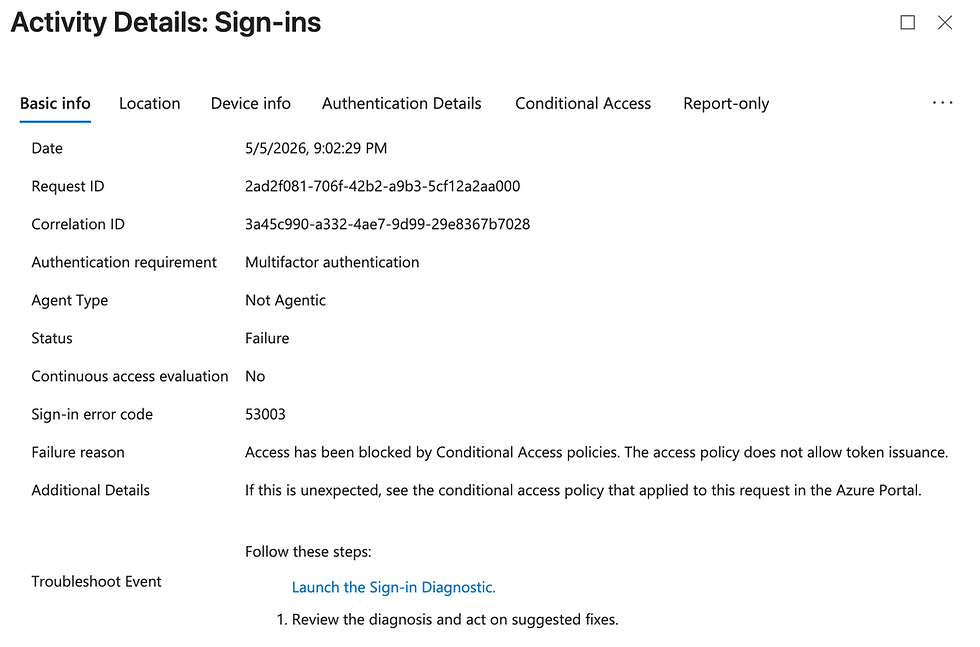

Without a proper naming convention, such as the one I outlined in my original Conditional Access series, it’s nearly impossible to determine that a policy is time-based. The absence of visible conditions might hint in the right direction, but it’s far from reliable.
Despite the lack of visibility in the GUI, the feature clearly works in the backend and can already be used in live environments.
That said, this is still a preview feature. It’s not recommended for production use, so any implementation or testing should be done with that in mind.
Time-Based Conditional Access Use Cases
A feature like this only matters if it solves real problems and fortunately, it does!
This list isn’t exhaustive, but here are a few practical scenarios from the top of my mind.
I'm certain this will be expanded over time as we get the feature into a more stable and production ready version.
Let’s imagine an organization, Contoso, a global production company operating 24/7 across multiple time zones.
Due to concerns around espionage, white-collar users have restricted access hours for business-critical CAD applications, while productivity tools like Microsoft 365 remain accessible at all times.
Case 1: Critical Business Applications
In Contoso, access to critical applications hasn’t been taken lightly.
To meet security requirements, access is currently handled through Entitlement Management, using access packages with approvals, time limits, and expirations. It works, but it comes at a cost.
There’s overhead everywhere:
IT has to maintain it
Managers have to approve it
Auditors have to review it
Users have to wait for it
And every now and then, something gets stuck in the process, resulting in friction and frustration.
With time-based Conditional Access, a lot of that complexity can simply… disappear.
Instead of granting and revoking access manually, access can be enforced automatically based on:
Time zones
Days of the week
Actual working hours
There’s still some upfront effort in designing the policies properly, but once that’s done, the system largely runs itself. Less friction, fewer dependencies, and fewer manual approval requests.
Case 2: Shift-based production
Production in Contoso runs 24/7, with workers operating in defined shifts.
Access has to be reliable, and available at all times for the bluecollar users, because of that, Contoso has leaned heavily on location-based Conditional Access policies for their blue-collar workforce.
And to be fair, that works.
But relying solely on location isn’t exactly defense in depth, especially not in today’s threat landscape.
Adding a time-based condition on top of existing controls changes the picture quite a bit.
Now, access isn’t just tied to where you are, but also when you’re supposed to be there. Combined with strict location enforcement through Continuous Access Evaluation, this allows Contoso to enforce shift boundaries much more cleanly, without getting in the way of production.
It’s one of those changes that doesn’t look huge on paper, but meaningfully tightens security in practice.
Case 3: After hour session tightening
Even in well-structured organizations, access outside standard working hours is unavoidable.
Late-night work, incidents, and urgent changes are part of the reality—particularly for IT teams and leadership.
Contoso already has strong authentication in place: Windows Hello for Business, FIDO2 keys, and certificate-based authentication. Combined with risk-based signals, this provides a solid security baseline during normal operations.
However, access outside regular hours inherently carries different risk characteristics.
By introducing time-based Conditional Access, Contoso can enforce stricter controls during these periods:
Require step-up authentication for after-hours access
Reduce session and token lifetimes
Limit prolonged or persistent access outside business hours
This approach strengthens security without introducing unnecessary friction during standard operations, while ensuring that higher-risk access patterns are handled more deliberately.
Conclusion: It's about damn time!
Time-based Conditional Access is one of those features that feels obvious in hindsight. It fills a long-standing gap and opens the door to more context-aware access control.
Even in its current state, with limited scope and no GUI support, it’s already powerful enough to experiment with and start shaping designs.
There are rough edges:
No visibility in the GUI
Limited policy type support
Minimal user feedback
But the foundation is solid, and the potential is clear.
And now for the all important bad joke break:
My friend once asked me; What rhymes with orange?
So I responded; No it doesn't 😎
As this feature matures, I'm expecting tighter integration, better tooling, and broader support across policy types.
Until then, now is a great opportunity to experiment in controlled environments, and start thinking differently about time as a security signal, not just a scheduling constraint.
Because in security, timing isn’t everything… but it’s getting pretty close.


It's fascinating to see Time-Based Conditional Access finally emerging, even if it's still in beta. The point about policies appearing in the GUI without editable details is a critical early limitation; managing these policies without a robust naming convention will feel like an infinite craft challenge for admins. I wonder if Microsoft will integrate time zone considerations more explicitly into the GUI or just rely on Graph for complex configurations? 🤔